NIU
- 3.5
- Rating
- 100.00K
- Installs
- Free
- Price

 Analysis by App-foxy
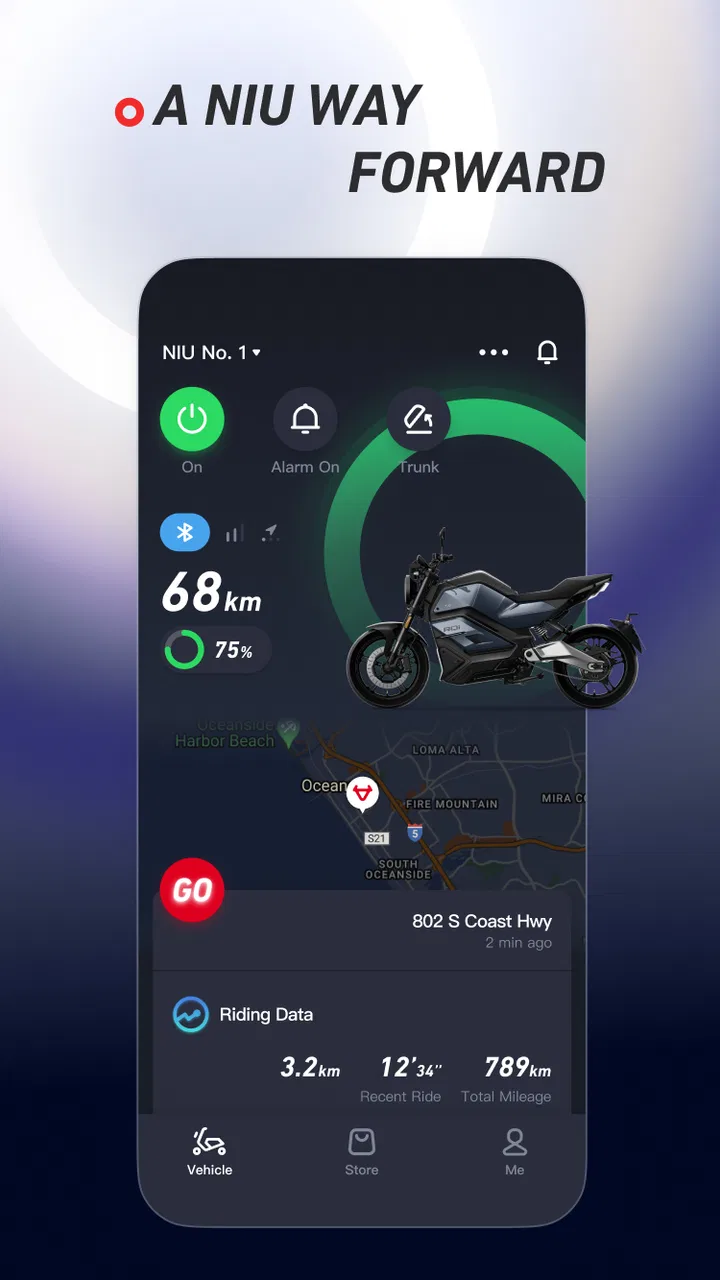
My first impression of NIU was that it is less about adding another gadget to a scooter and more about making ownership easier to check. Developed by NIU Technologies, this free Auto & Vehicles app is designed to monitor the condition and status of a compatible scooter from a phone. That sounds modest, but it matters when the scooter is part of a daily commute rather than an occasional weekend ride.
I approached it as an owner would: not by asking whether the app looks impressive for a few minutes, but whether I would still open it after the novelty disappeared. The answer is mostly yes, provided your scooter is supported and you want a quick digital view of its condition. It is not a replacement for riding knowledge, physical checks, or workshop care. Its value comes from reducing small uncertainties between trips.
The app has been available since August 18, 2016, and its current version is 5.12.2. It is free, suitable for Everyone, and works on Android 8.0 or later. With more than 100 thousand installs and an average rating of 3.7 from roughly 3.9 thousand ratings, it has a useful user base but also a mixed reputation. That balance matches my experience: the idea is practical, while the day-to-day satisfaction depends heavily on how reliably the app connects with the scooter.
You May Also Like

 Google Keep - Notes and lists
Google Keep’s Quiet Growth Shows the Appeal of Simpler Notes
As mobile work gets busier, Google Keep keeps winning a simple contest: capture a thought quickly, find it later, and get on with the day.

 Blood Strike: 2.5 Anniversary
Blood Strike’s Loadouts Turn Every Drop Into a Tactical Gamble
A close look at Blood Strike’s custom loadouts: how fast access to signature weapons reshapes its battle royale rhythm, rewards preparation, and narrows the gap between fights.

 Pandora - Music & Podcasts
Pandora’s Music Is Easy to Start, but Harder to Recover
Pandora’s strength is its low-effort path from a seed to a station. Its weak spot is how much confidence it asks you to place in connection, setup, and quiet recovery.

 8 Ball Pool
 Is Built on Rivalries, Rematches, and Routine
A close look at the rivalries, rematches, shared routines, and unanswered safety questions that turn a quick pool match into a persistent mobile community.

 Samsung Music
’s Quiet Strength Is Playing What You Already Own
Its reach comes less from spectacle than from dependable access to a personal library. That simplicity is both the app’s strongest retention engine and its ceiling.

 AccuWeather: Weather Radar
AccuWeather Review: A Quick, Clear Forecast for Everyday Decisions
For everyday plans, the best forecast is the one you can understand quickly. AccuWeather makes rain timing, radar, and local conditions easy to act on, with a few trade-offs.
More From Our News Desk



What NIU feels like during the first week
The first week is when the app feels most useful. After setting it up with the scooter, I can treat the phone as a convenient status window rather than walking outside simply to satisfy curiosity. A quick check before leaving can confirm whether the scooter appears ready and can help me notice information that would otherwise be easy to overlook.
That is especially helpful when the scooter is parked away from home, when the weather is unpleasant, or when I am preparing for an early trip. Instead of turning the experience into a technical inspection, the app gives me a reason to build a simple habit: check the scooter, gather my things, and leave. The best part is not any single screen; it is the small reduction in mental effort.
I would not describe the setup as something every rider will find equally smooth. A connected vehicle app has more points of failure than a normal notes or map app. The phone, account, scooter, connection, and app state all have to cooperate. If the status takes too long to appear, or if I need to repeat a connection step, the convenience quickly becomes less convincing.
My practical advice is to complete the initial setup when you are not in a hurry. Keep the scooter nearby, make sure the phone has a stable connection, and take time to understand what each status area means. The first useful test is not an emergency trip; it is a short routine check while you still have time to solve a login or pairing problem.
One non-obvious advantage is that the app can turn vague worry into a repeatable decision. Many riders do not need a detailed technical report every time they leave. They need to know whether anything looks unusual enough to justify a closer look. Used that way, NIU works as a screening tool. It helps decide when to inspect the scooter physically, rather than pretending that a phone screen can replace inspection.
For a new owner, this creates a gentle introduction to scooter care. Instead of waiting until a warning becomes impossible to ignore, I can make checking part of the departure routine. That is a stronger reason to keep the app installed than simply enjoying the novelty of seeing a vehicle connected to a phone.
A realistic daily scenario
Imagine leaving work after the scooter has been parked for several hours. I open the app before walking to the parking area and look at the available status information. If everything appears normal, I still do a quick physical check around the scooter, but I am not starting from zero. If something looks different from the last check, I can allow extra time rather than discovering the issue when I am already late.
That workflow is more valuable for regular riders than for people who use a scooter only once in a while. A daily commuter benefits from repeated, low-effort confirmation. An occasional rider may forget the app exists, and the setup effort can feel disproportionate to the number of trips. In that case, a physical pre-ride check and the scooter’s own indicators may be simpler.
The same distinction applies to families or shared scooters. If more than one person uses the vehicle, an app can make status checking more accessible than relying on whoever last rode it. However, I would still establish a clear handover habit. A phone view should not become an excuse for assuming that another rider handled charging, damage checks, or basic safety.
What the app does better than ordinary alternatives
The usual alternative is not another sophisticated vehicle platform. It is a mixture of dashboard indicators, memory, paper notes, and occasional physical inspection. Those methods are dependable in some ways, but they do not offer the same convenience of checking from a phone. NIU’s strength is the connection between the scooter and a familiar device that is already in my hand.
A generic vehicle-maintenance notebook can record dates and observations, but it cannot provide the same immediate status view. A general reminder app can tell me to inspect the scooter, yet it cannot make that inspection feel connected to the vehicle. On the other hand, those simpler tools may be better for maintenance history because they are not tied to one app’s connection behavior.
This is the key trade-off: NIU is more convenient for current awareness, while a manual log can be more flexible for long-term records. I would use the app for quick checks and my own notes for repairs, tire observations, service conversations, and anything I may need to remember later. Treating it as the only record would be a mistake.
Why it can still matter from month to month
After the first month, the excitement of connected scooter ownership fades. That is where I think the app earns its place, but only through repetition. Its lasting value comes from making a small action easier often enough that I actually do it. If I open it before regular rides, it becomes part of ownership rather than a novelty.
The strongest long-term use is preventive awareness. A rider who checks status consistently is more likely to notice changes in routine: a condition that does not look familiar, a scooter that does not appear as expected, or a need to investigate before the next trip. The app does not perform the maintenance for me, but it can make the first step more visible.
I also like the psychological benefit of separating “the scooter seems fine” from “I have not checked.” Those are not the same thing. A quick digital check gives me a deliberate moment to decide whether I need a closer look. That is a small distinction, but it supports better habits, particularly for people who tend to rush out the door.
Still, I would not open NIU every day just because I own a NIU scooter. If the information remains unchanged and the connection feels slow, the routine can become unnecessary friction. The best habit is conditional: check before important trips, after the scooter has been unused for a while, or whenever something feels different. That keeps the app useful without turning it into a ritual that has no practical purpose.
Another useful workflow is to pair the app with a weekly physical review. During the digital check, I look for anything that deserves attention. During the physical review, I inspect the scooter itself and note issues that a phone cannot judge well. This division of labor prevents overreliance on the app while still giving it a meaningful role.
For commuters, the recurring value is strongest when the scooter is part of a predictable schedule. For leisure riders, the value is more occasional but can still appear before longer outings. I would be less enthusiastic for someone who wants a broad, brand-neutral vehicle-management platform, because this app is naturally centered on the NIU ownership experience rather than serving every vehicle in a household.
When another option makes more sense
If your main goal is route planning, a navigation app will be more useful. If you want detailed maintenance records across several vehicles, a dedicated logbook or spreadsheet may suit you better. If you are buying a scooter based only on app features, I would reverse that priority: choose the vehicle, riding position, support experience, and practical ownership costs first, then treat the companion app as a bonus.
NIU is also not the right choice for someone who dislikes connected products on principle. The app adds convenience, but it also adds another account and another layer between the rider and the vehicle. A person who prefers simple mechanical routines may find a physical check faster and more reassuring.
For a new smartphone, the minimum operating-system requirement is Android 8.0, so most compatible Android users should find the software requirement approachable. The more important question is not whether the phone can install it, but whether the owner will use the app consistently enough to justify it. Installation is easy to understand; lasting usefulness depends on behavior.
The maintenance burden behind the convenience
The app itself is not a substitute for maintaining the scooter. I still need to pay attention to tires, brakes, lights, charging equipment, visible damage, unusual sounds, and the general condition of the vehicle. A status screen can support that process, but it cannot provide the judgment of a careful rider or technician.
My preferred routine is deliberately short. Before a normal ride, I check the app when there is a reason to do so, then look at the scooter directly. Before a longer journey, I give the physical inspection more attention and avoid relying on a single digital reading. This keeps the app in its proper role: an early-warning and convenience layer.
There is also a maintenance burden on the software side. Phones change, permissions can be adjusted, accounts can be forgotten, and connectivity can behave differently from one location to another. I would not wait until the moment I need the app urgently to discover that I have been logged out or that the scooter is not communicating as expected.
That is one of my more important tips: test the app during ordinary conditions, not only when something has gone wrong. A tool that is familiar on a calm day is easier to trust appropriately when a real question appears. If the app does not show what I expect, I treat that as a prompt to inspect the scooter manually rather than as proof that the scooter is unsafe or fully healthy.
The app’s free price lowers the barrier to trying it, and its Everyone content rating makes it broadly approachable. But free does not mean effortless. The cost here is attention: learning the workflow, remembering to check it, and understanding its limits. For me, that is reasonable because the habit can prevent uncertainty. For a rider who rarely uses the scooter, it may not be worth the extra step.
Where fatigue begins
The first source of fatigue is repetition without new information. If every check produces the same result and the app takes longer to open or refresh than expected, I begin to question the habit. A companion app must be quicker than the worry it is meant to reduce. When it is not, I naturally fall back to the dashboard and a physical glance.
The second is uncertainty about whether a delayed status reflects the scooter or the connection. That ambiguity is frustrating because it creates another question instead of answering the first one. I do not want to diagnose a networking issue before a commute. In those moments, the app’s usefulness depends on how clearly it communicates the current state.
The third is overconfidence. A rider may assume that because the app looks normal, every important part of the scooter is fine. That is the wrong mental model. The app can encourage good maintenance, but it can also create false reassurance if it becomes the only check. I consider this the most serious long-term risk—not a dramatic failure, but a gradual weakening of basic rider awareness.
There is a simple way to avoid that trap: use NIU to decide what deserves attention, not to decide that attention is unnecessary. I still look at the vehicle, listen for changes, and respond to anything unusual. That approach gives the app a useful job without asking it to do more than it should.
Who will keep using it
I think NIU is a good fit for owners who ride regularly, like having a quick status check on their phone, and are willing to combine digital information with ordinary scooter care. It is particularly sensible for someone building a new commuting routine and looking for a small prompt to stay aware of the vehicle.
I would be more cautious recommending it to occasional riders, people managing several brands of vehicle, or anyone expecting a complete maintenance-management system. Those users may prefer a general-purpose tool, a manual record, or simply a reliable physical checklist. The app’s focused design is an advantage for NIU owners, but it also narrows its usefulness.
The rating of 3.7 from around 3.9 thousand ratings suggests that the experience is not universally smooth, and I would set expectations accordingly. The app can be genuinely helpful without being flawless. I would install it, test it with my scooter, and keep it only if the connection and status checks fit naturally into my routine.
My long-term verdict on NIU
After the novelty fades, NIU remains worthwhile as a small ownership companion rather than a central control panel for every scooter need. Its lasting appeal comes from habit: a quick look before a meaningful trip, followed by a sensible physical check. That combination can make ownership feel more organized without demanding much time.
I would recommend it to a friend who owns a compatible NIU scooter and wants convenient status monitoring at no financial cost. I would explain that the app is most useful when it supports a routine, not when it replaces common sense. I would also suggest trying it during relaxed conditions first, so any setup or connection friction is discovered before it matters.
My final judgment is positive but measured. NIU earns space on my phone when I use it as an early-warning tool and a reminder to stay engaged with the scooter. It loses that space when I expect it to replace inspections, provide a complete maintenance history, or work as a universal vehicle app. For the right rider, its recurring value is quiet and practical: fewer unanswered questions, better checking habits, and a clearer connection between daily travel and basic scooter care.
FAQs for NIU
01What is NIU and what does it offer?
NIU is a cutting-edge app designed to streamline your daily activities by integrating task management, calendar syncing, and seamless communication tools. It offers a user-friendly interface, customizable widgets, and smart notifications to keep you organized and efficient. Whether you're managing personal tasks or collaborating with a team, NIU provides all the features you need in one convenient platform.
02Is NIU compatible with both Android and iOS devices?
Yes, NIU is compatible with both Android and iOS devices. It is available for download on the Google Play Store and the Apple App Store, ensuring a smooth user experience across platforms. The app is optimized to function seamlessly on various devices, maintaining its robust features and intuitive interface regardless of the operating system.
03Does NIU require a subscription, or is it free to use?
NIU offers a freemium model, allowing users to access basic features at no cost. For those seeking enhanced functionality, such as advanced task management tools and premium support, NIU provides a subscription-based service. The subscription plans are competitively priced and offer excellent value for professionals and power users.
04How secure is my data within the NIU app?
NIU prioritizes user privacy and data security. The app implements end-to-end encryption for all communications and data storage, ensuring that your information remains protected. Regular security updates and compliance with industry standards further enhance the app's security measures, providing peace of mind to all users.
05Can I integrate NIU with other apps and services?
Absolutely. NIU supports integration with a variety of third-party apps and services, including popular productivity tools like Google Calendar, Slack, and Trello. This capability allows users to synchronize their workflows and enhance productivity by connecting NIU with their existing app ecosystem, facilitating a more cohesive user experience.
Pros
- Intuitive user interface design.
- Wide range of customization options.
- Seamless cross-platform integration.
- Frequent updates and improvements.
- Efficient battery usage.
Cons
- Limited offline functionality.
- Subscription required for premium features.
- Occasional minor bugs.
- High data usage for certain features.
- Limited support for older devices.

Gallery